


ZOSI 8MP/5MP PoE Security Add on IP Camera Waterproof AI Detection 2-Way Audio
Specifications
| Return Shipping Will Be Paid By | Seller |
| All Returns Accepted | Returns Accepted |
| Item Must Be Returned Within | 30 Days |
| Refund Will Be Given As | Money Back |
| Brand | ZOSI |
| Type | Bullet |
| Items Included | Camera |
| Connectivity | Ethernet Cable |
| Surveillance Technology | IP/Network |
| Smart Home Compatibility | ZOSI smart, AVSS |
| Smart Home Protocol | POE, Infrared, Wi-Fi |
| Operating Sound Rating | 90 dB |
| Location | Outdoor & Indoor |
| Maximum Resolution | 3840*2160 |
| Color | white/black |
| Manufacturer Warranty | 1 Year |
| IR Night Vision | Up to 100ft/30m |
| Compatible POE NVR Systems | ZOSI 5MP/8MP POE NVR |
| Features | Add-On Camera |
| Compatible Brand | ZOSI |
| MPN | Does not apply |
| Operating Range | 6 m |
| Country/Region Of Manufacture | China |
| Storage Capacity | 0TB |
| Unit Type | Unit |
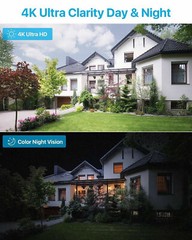
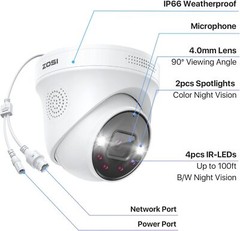
When the camera and ZOSI NVR are utilized in conjunction (NVR not included), motion detection triggers the camera to capture pictures and send them to our mobile phones via the ZOSI Smart App. Smart Face/Person/Vehicle Detection Advanced AI algorithms ensure that potential threats are identified and acted upon promptly. Immediate Warning of Real Dangers With our upgraded detection, you can trust that the alerts you receive are accurate and reliable. Double Defense Against Intruders When suspicious activity is detected,it triggers spotlights and sirens to scare off intruders. Two-Way Talk in Real Time You can hear and talk directly to anyone who approaches via 2-way audio. Flexible Remote View Share live view with your family, remote access and playback anytime anywhere you need. Flexible Remote View 1.Remove the Base Panel Hold and press on the top of the camera and turn it counterclockwise to get off the mounting plate from the dome camera. 2.Screw the Base Panel Use mounting template to drill holes on the ceiling or wall. Then screw the base panel to the mounting holes on the ceiling or wall. 3.Lock Camera with Base Panel Mount the camera to the mounting plate and rotate it clockwise to lock the camera with the base panel. Make sure the camera is locked tightly. 4.Ajust the Surveillance Angle Once the camera is installed, you can rotate the camera body and adjust it to a proper angle. On May 27, 2024 at 20:38:57 PDT, seller added the following information:
Related Items